Built for market booths · Lightweight POS

Your booth's
pocket pal

From setup to packing up — one app handles it all.
No card terminal, no account binding, works offline at your booth.

BOO-POS mascot beagle

One phone
is your booth register

BOO-POS is a checkout tool built specifically for market booths.

Everything you need at your booth,
ready to go

Screenshots show the Traditional Chinese UI — the app interface supports ZH / EN / JA. Tap the coffee cup (SET) on the home screen → Language.

01
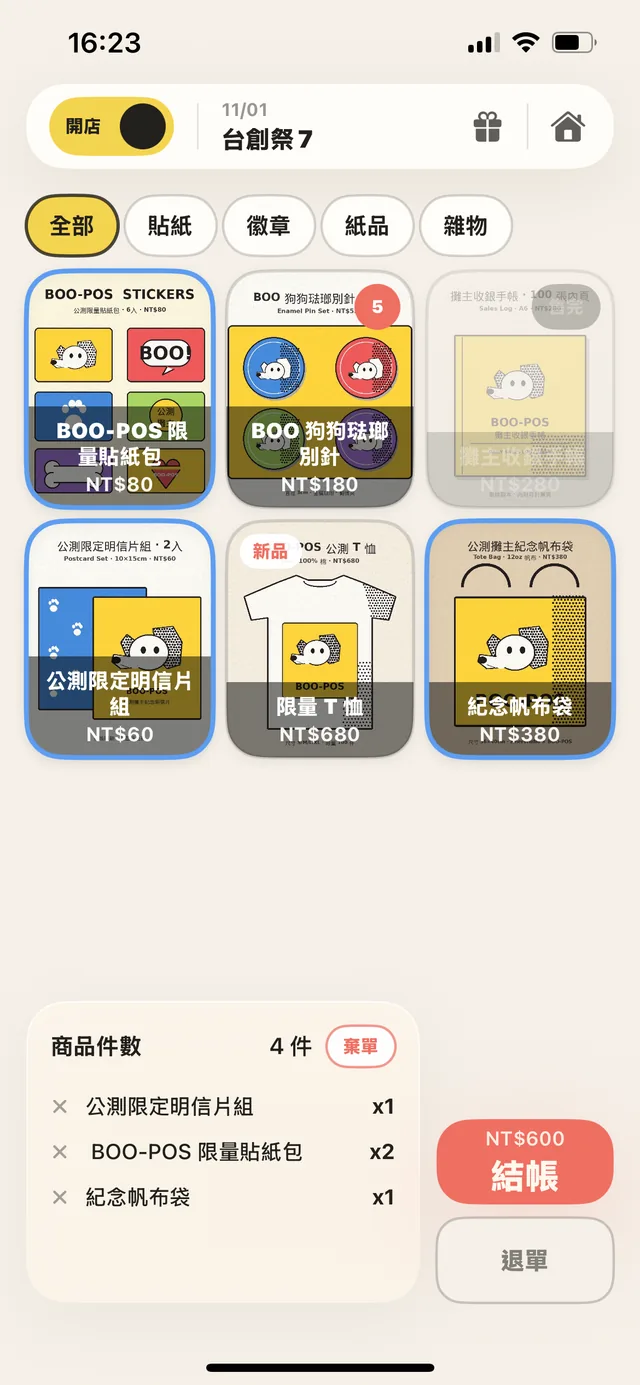
Product wall checkout screen
FRONT · Storefront

Three seconds to learn, tap to sell

From browsing to checkout — every step clear, nothing in the way.

Lay out products as a photo wall, swap categories, tap once to add to cart. While the customer is still looking, you're already ready to ring them up.

02
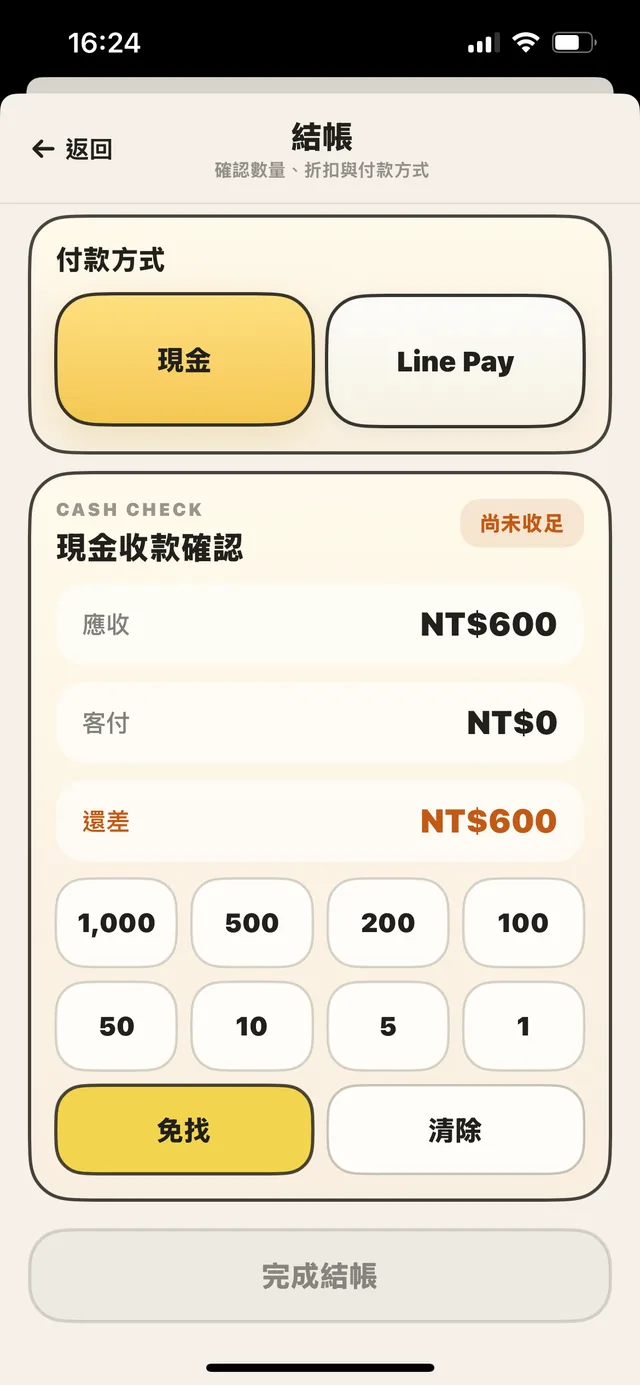
Cash change calculation screen
PAY · Payment

Cash change, calculated instantly

Denomination panel adds up; due vs. paid clear at a glance.

Enter what the customer hands over — the change appears on the spot. Tap denomination buttons to add them up. Even at peak hours, no fumbling, no miscounts.

03
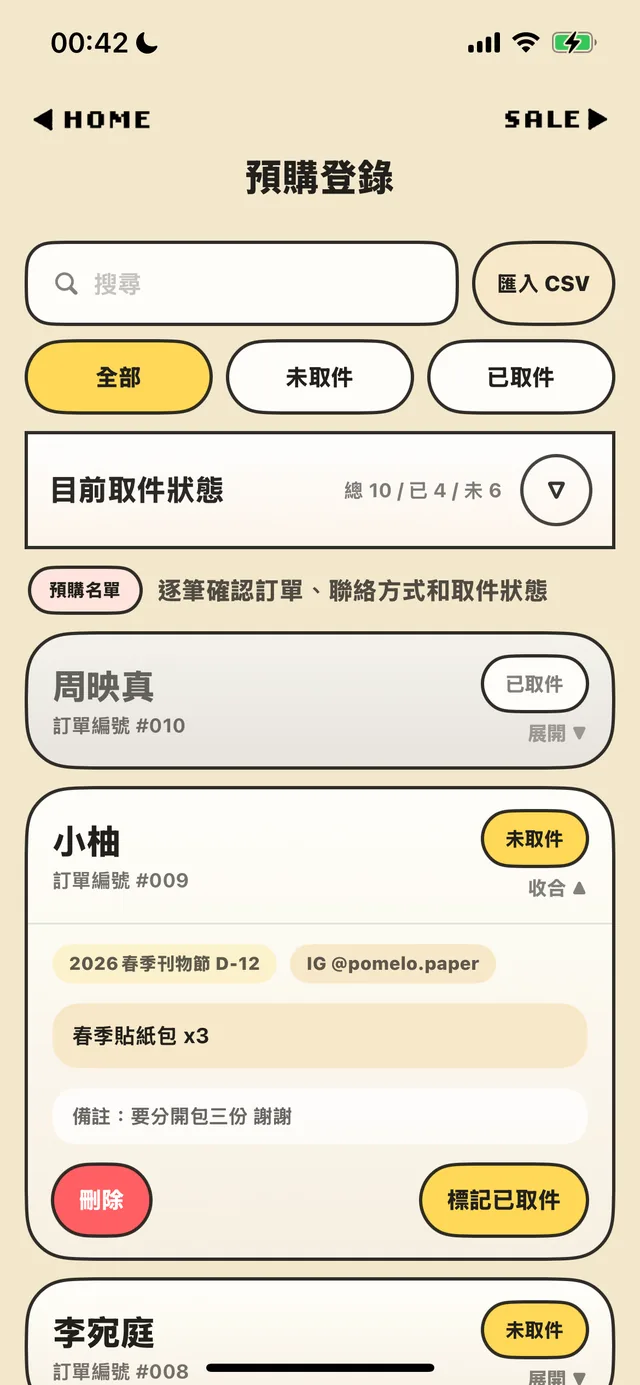
Pre-order pickup screen
PICKUP · Pre-orders

Take orders online, hand them out at the booth

Add on the spot, or import a whole list by CSV.

Add walk-up pre-orders right in the app, or import a prepared list by CSV. Search by name, mark as picked up — who got theirs, who hasn't, one glance and you know.

04
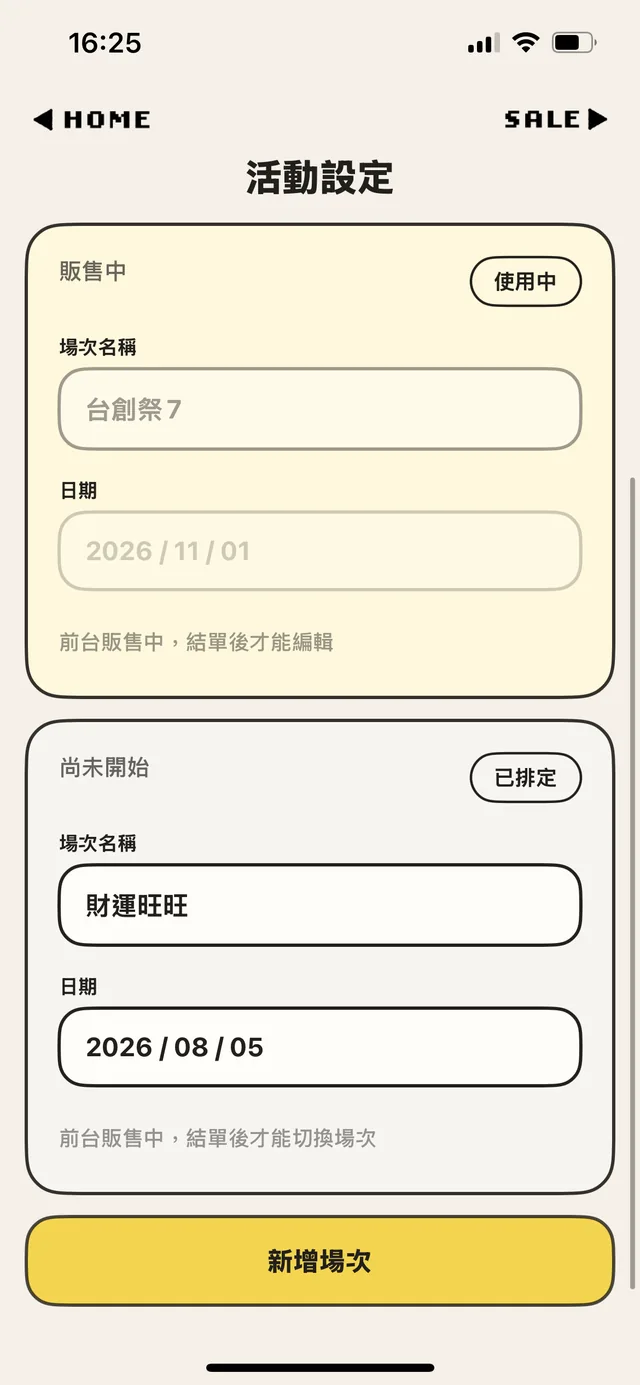
Event settings screen
EVENT · Events

Switch between markets on the fly

Schedule every event in one app, year-round.

One market this weekend, another next month — each gets its own event slot. Products and records stay separate, no resetting between, lined up clean all the way to year-end.

05
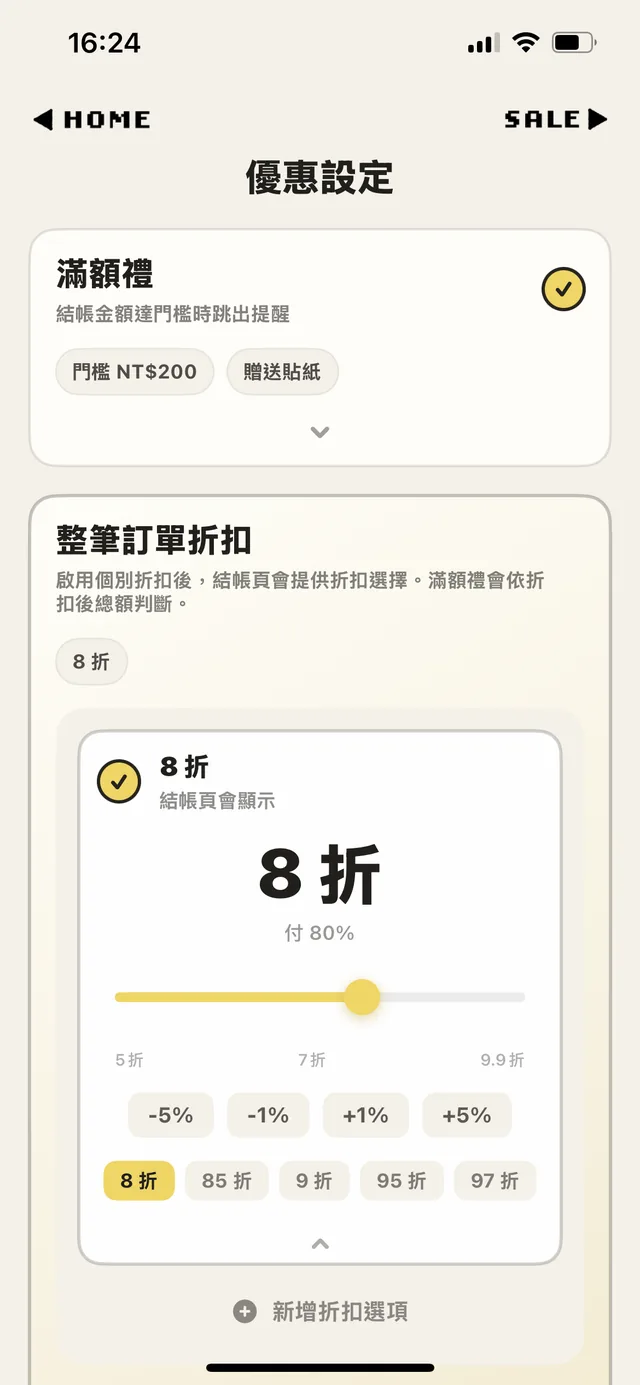
Promotions settings screen
OFFER · Promotions

Bundle gifts, set discounts

Never miss a freebie or a discount.

Set a spend threshold and the app reminds you to hand out the bonus gift at checkout; order-wide discounts apply in one tap. You set it up; the app remembers the rest.

06 BACKUP · Data Backup

Export backups, hand off to helpers

Take your inventory with you; no order lost on handoff.

Back up inventory and product data — product images included — to a file and share it with helpers. They import it and keep selling on their own phones. No re-uploading products, no cloud, more hands on the booth.

Seven modules, all in hand

StorefrontFRONT

Products as a photo wall, pick a variant, tap to checkout

InventorySTOCK

Variants, quick stock adjust, active product lists

PaymentPAY

14-currency cash change, customizable payment tags

PromotionsOFFER

Bundles, volume pricing, tiered gift-with-purchase prompts

Sales RecordsRECORD

Per-variant detail, CSV export, refunds auto-restock

EventsEVENT

Multiple events kept separate; no resetting between markets

Pre-ordersPICKUP

Add in-app or import CSV; verify pickups on the spot

+ AND MORE
🌏 ZH / EN / JA interface 💱 14 currencies 📶 Works offline 🤝 Backup & hand off to a helper 📊 CSV export & import 📱 iPad landscape support 🐶 Swappable completion mascot
BOO-POS mascot beagle

BOO, BOO!!

When you're running a booth on your own, things can get hectic fast.

You're still tracking sales with pen and paper,
and once the booth gets busy, it's easy to forget a bonus item or miss a special gift.

Sales records, change, freebies, discounts, inventory, pre-order pickups——
whether it's a big booth or a small one,
everything on the table is a piece of work someone stayed up day and night to bring to life.

And yet, there has never really been an intuitive booth POS app made specifically for creators.

Through my encounter with Vibe Coding,
I was finally able to turn an idea I had carried for a long time into a real app,
combining it with my own years of experience running booths at doujin events and markets.

BOO-POS = Booth + POS

The name sounds a little like a dog's bark,
and it took the shape of my favorite beagle.

I hope this little companion will continue to stay by your side
through every day you spend running your booth.

MUMU (ZINER STUDIO)

Version Updates

2026.09.16 iOS v1.3.0

Add pre-orders on the spot, leave notes at checkout, see fees when you reconcile

This wave is about what happens after the booth closes — no more CSV-only pre-orders, every sale has a number you can find, and you can see what each payment method really brought in.

New

  • Add pre-orders in the app No CSV needed — tap “Add pre-order” and fill it in on site. “Save and add another” lets you enter a whole batch in a row.
  • Pre-order screen redesigned All / Not picked up / Picked up tabs show counts directly; search by name, order number, event or item. Two-column layout on iPad landscape.
  • Checkout notes Leave a note on any sale (custom request, pickup by proxy, follow-up…). Edit it later from Sales Records; it’s included in CSV exports.
  • Fixed order numbers Every sale gets a permanent order number, and older orders are backfilled — easier to look up and match against pre-orders.
  • Payment fees & settlement report In Payment Settings, record the fee rate for methods like LINE Pay or card; the app calculates it at checkout and saves it on the order. Sales Records gains a “Payment Settlement” view listing count, gross, fees and estimated net per method, with its own CSV export.

Improvements

  • Photo library loading feedback Photos not yet downloaded from iCloud now show a loading state and a clear message instead of doing nothing.
  • Sturdier large backups JSON export/import stabilized, with progress shown.
  • Fixed sold-out hiding for products with variants.
  • Clearer close-shop confirmation.
  • Assorted UI consistency, copy and translation tweaks.

iOS release: the Android version is being aligned and will catch up in stages.

About Premium: the free tier caps at 5 products; product variants, unlimited inventory and other advanced features unlock with Premium (NT$250 one-time buy-out, no subscription).

See previous releases
2026.07.23 iOS v1.2.5 · Android v1.0.0

Android officially released, feature parity with iOS

Android is out and iOS is up to 1.2.5 — this wave fills in the fiddly stuff that trips people up at the booth.

What's new

  • Android — official release Search "BOO-POS" on Google Play. Full feature parity with iOS.
  • Quick stock adjust Tap a product in Inventory and a panel slides up — −/+/+10 or type in a number. Restocking without going into edit mode.
  • 14 checkout currencies Added CNY, GBP, SGD, AUD, THB, MYR, VND, PHP and more. Now a searchable dropdown.
  • Zero-price items Products or variants can be set to 0 and checked out normally — handy for freebies.
  • Tablet display density Set the product-grid density on tablets — spacious / standard / compact.
  • Feedback attaches device info Optional toggle to include your device model and OS version, so we can fix bugs faster.

Polish & fixes

  • Full tablet adaptation POS, inventory, sales records, offers, home — all reflowed for tablet sizes (landscape master–detail).
  • In-app help revamped Two-tier topic-first structure — pick a topic, then see the steps.
  • Sharper CSV import checks Format issues are flagged clearly for both product and variant CSVs.
  • Many small UI-consistency, copy, and translation tweaks.

Both iOS and Android are ready: search "BOO-POS" on the App Store or Google Play — both are official releases and share the same features.

About Premium: the free tier caps at 5 products; product variants, unlimited inventory and other advanced features unlock with Premium (NT$250 one-time buy-out, no subscription).

2026.06.09 iOS v1.2.0

Product variants, multi-product bundles, and a full UI redesign

Variants on one product, free mix-and-match across products, tiered gift-with-purchase — however this market sells, you can lay it out.

What's new

  • Product variants Build multiple colors / sizes / styles under one product, each with its own price and stock; pick the variant right at checkout, and sales break down per variant. (Premium feature)
  • Multi-product bundles Tie different products A + B + C into one bundle price, mixed freely — a different mechanism from same-product quantity tiers.
  • Tiered gift-with-purchase Set several spend thresholds with matching gifts; the app prompts automatically at checkout.
  • Active product lists Switch "what to sell at this market" freely; turn products on / off individually.
  • New checkout currencies Korean won ₩, euro €.
  • Inventory sorting Sort by name / price / stock / created date; pick "Custom" to keep your long-press drag order, mirrored on the selling screen.

Polish & fixes

  • Full UI redesign (checkout, product editing, offer settings, inventory), with a much stronger iPad landscape experience.
  • Change a quantity on the checkout page and go back — the cart keeps your edits.
  • In-app FAQ fully refreshed Stuck on a step or want a walkthrough? Find answers right inside the app.
  • Many small UI-consistency, copy, and translation tweaks.
2026.05.28

Multi-currency, multi-language UI, and bundle pricing — all live

Sell at overseas markets. Stop tallying bundle discounts in your head.

What's new

  • HKD / JPY / USD checkout Settings → Currency. Take foreign cash at overseas markets — no conversion needed.
  • Per-currency product pricing Switch currency to edit and display that currency's price.
  • Product bundle pricing Set tiered deals like "3 for $100" — the cart applies them automatically once it hits the threshold.
  • Manual checkout discount Enter on-the-spot promo amounts in one tap.
  • Cash numpad input Type the amount directly instead of tapping denominations.
  • ZH / EN / JA UI Settings → Language. Overseas customers and staff can use it right away.

Polish & fixes

  • iPad layout polish Larger type and reworked spacing on key screens.
  • Fixed: CSV export collision when two events share name and date.

What booth sellers ask most

Does BOO-POS cost anything?
BOO-POS is free to download. The core booth functions — checkout, payment, change — are unlocked from the start. The free plan supports up to 5 inventory items. To register unlimited items and unlock advanced features like product variants and bundle pricing, upgrade to Premium — a one-time NT$250 (~US$8), no subscription.
Do iOS and Android have the same features?
Yes. iOS and Android are in sync — checkout, inventory, offers, pre-orders, and export all work the same way, and both are the official release. Any small platform-specific quirks we polish as we go.
Does it work without internet at the booth?
Yes. Checkout, payment, change, and backup handoff all work offline. BOO-POS doesn't rely on cloud sync — it runs fully offline at your booth.
Is there an Android version?
Yes! Android is officially released — search "BOO-POS" on Google Play, or use the download button below. Feature parity with iOS.
Can one phone handle multiple events?
Yes. Use Event settings to create separate market days; each event's products and sales records are kept independent, no need to reset between markets.
Can helpers use it too?
Yes. Back up your inventory and product data (product images included) to a file and AirDrop it to a helper — they import it and pick up checkout on their own phone. No re-uploading inventory, no internet needed. (File-based sharing, not real-time cloud sync.)
Who's BOO-POS for?
Market booths, craft fairs, handmade vendors, pop-up shops — any small seller who needs fast on-the-spot checkout without lugging a clunky register around.
Can pre-orders only come in by CSV? Can I record one taken at the booth?
Yes, you can record it directly. Open Pre-orders, tap “Add pre-order”, and fill in the order number, name and items. Taking several in a row? Use “Save and add another”. CSV import is for when you already have a full list before the event and want to bring it all in at once — mixing both is fine.
Does BOO-POS process card payments or Line Pay?
No. BOO-POS is a record-keeping POS — no payment gateway integration. "Payment method" is a customizable tag — you can set up Cash, Line Pay, credit card, or any local payment option you use, and the app logs which method you took for each sale. The actual transaction still happens through your own Line Pay account, card terminal, or cash drawer.

Didn't find what you were looking for? Drop us a line at booposapp@gmail.com — or tap the dog bowl on the app's home screen to send feedback directly.

Ready to make
your booth lighter?

Free to download on iOS and Android. Premium is a one-time NT$250 (~US$8) unlock — no subscription.

BOO-POS mascot beagle